Sending Quotations
To output a Quote you can select one of following three buttons from the Quote Detail View.
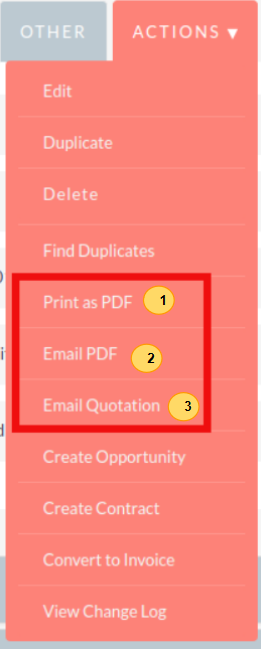
AOS provides users with three methods of sending Quotes:
Print as PDF – Allows you to select a template and download or save a PDF of the Quote.
Email PDF – Allows you to select a template then directs you to the SuiteCRM email client ‘Compose’ screen. The Quote PDF will be attached to email and the email will be addressed to the related Contact of the Quote. This allows you to fill out the email body.
Email Quotation – This directs you to the SuiteCRM email client ‘Compose’ screen. The email will be addressed to the related Contact of the Quote. There will be no attachment and the Quote will be displayed within the body of the email.
Convert To Invoice
With AOS you can convert Quotes to Invoices. This can be achieved by clicking the ‘Convert to Invoice’ button on the Quote Detail View.
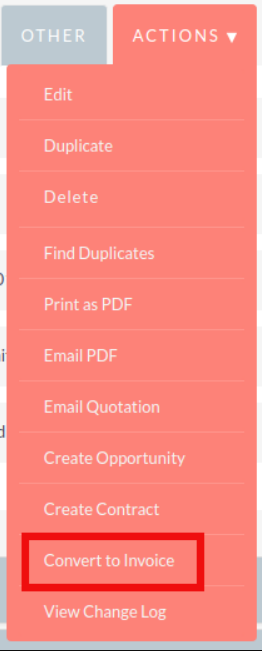
This functionality will redirect users to the Edit View of an Invoice record. Fields will be populated based on your Quote counterparts and Line Items will be copied over. When you are ready to create the Invoice, click the ‘Save’ button. Converting a Quote to an Invoice will set the Invoice Status of the quote to ‘Invoiced’.
Create Contract
As well as converting to an Invoice, AOS allows users to create a Contract based on a Quote. This can be done by clicking the ‘Create Contract’ button on the Quote Detail View.
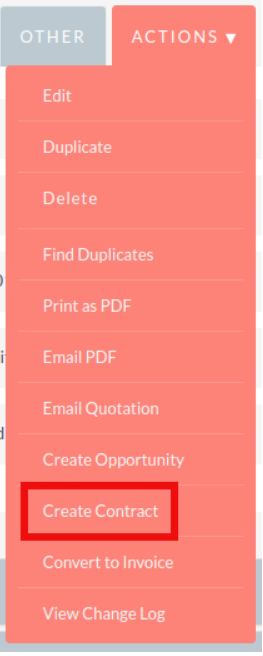
This will redirect you to the Edit View of a Contract record, pulling through any appropriate fields from the Quote.
This includes any Line Items on the Quote.